

A floor plan conversion moves six groups of records. Dealers and their lines come first. Then the units on those lines, the money attached to each unit, the audit history, titles plus documents, and finally the integrations that feed all of it. The data load is the easy part. The conversion is finished when every unit on every line ties out to the old system, to the cent, on the same cutoff date.
Plenty of lenders are pricing that work this year. Solifi announced its acquisition of DataScan on September 23, 2025. Both companies said customers keep their existing service level commitments. Nothing has to change today. But renewals keep arriving, and a renewal is when a lender either signs for another term or starts a conversion. We covered the stay, extend or migrate decision in what the Solifi and DataScan consolidation means for lenders. This piece is for the lender that's leaning toward moving and wants to know what the move involves.
We build VeroOS, which competes for this work, so read the Vero section at the end with that in mind. Everything before it applies whichever system you pick.
Start with the contract, not the data
Your notice date matters more than your renewal date. Most software agreements require written notice some number of days before the term ends, and missing it can roll you into another term. Find that clause first, then work backward from it.
Four more things to pull from the agreement before anyone writes a data map:
- Export rights. What data you're entitled to receive and in what format. Also whether the vendor charges for the extract.
- Transition assistance. Whether the vendor will answer questions about its own tables during the move, and at what rate.
- Read-only access after termination. Examiners and auditors will ask about history. Know how long you can still log in and look.
- Fees that start at notice. Some agreements change pricing or service terms once notice is given.
Have your counsel read those clauses. We can tell you what a conversion needs from them. We can't tell you what your agreement says.
Inventory what actually moves
Lenders tend to underestimate the size of a floor plan conversion because they picture the dealer list. The dealer list is the small part. Most of the work sits underneath it.
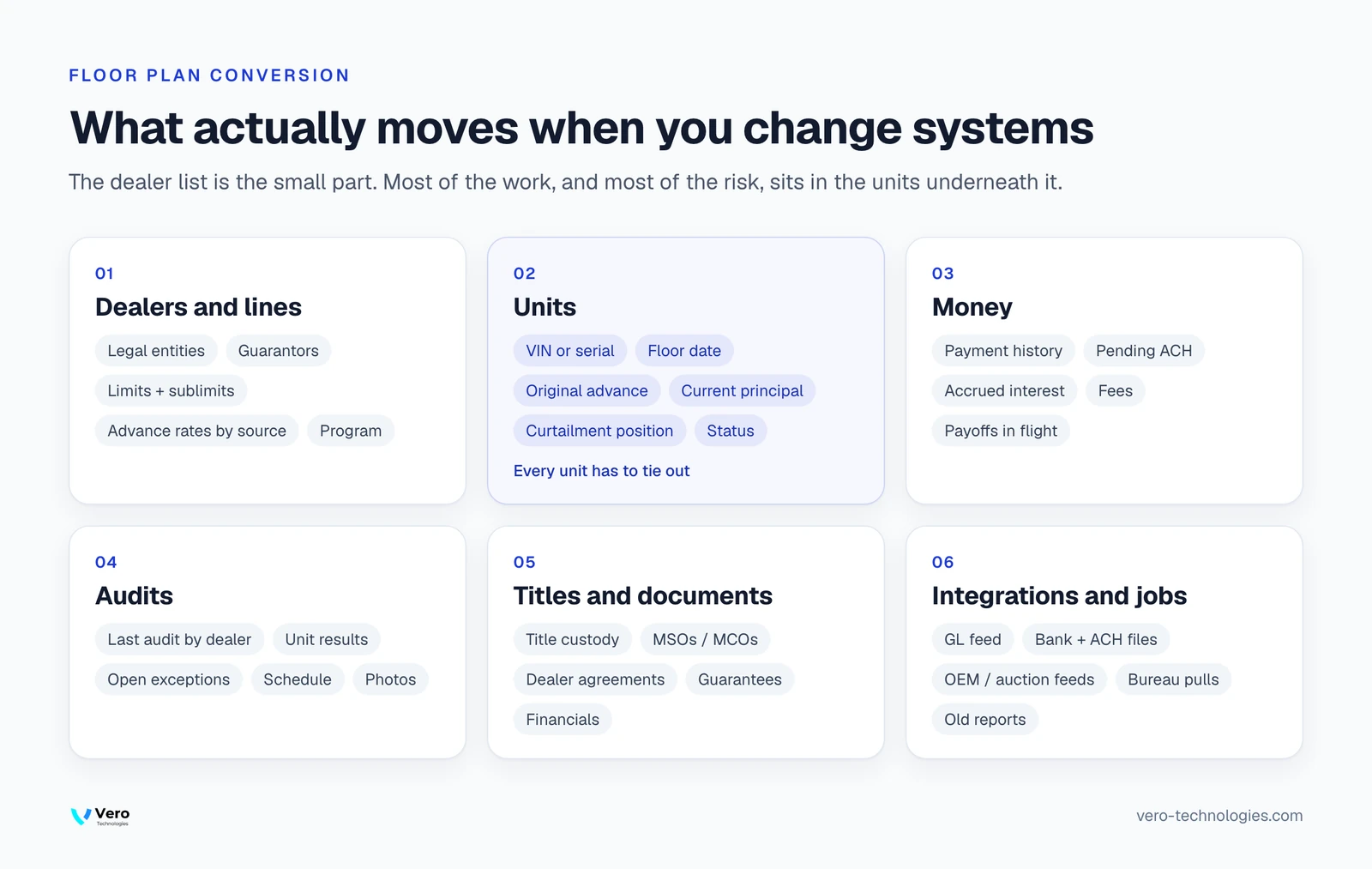
- Dealers and lines. Legal entities and guarantors. Credit limits with their sublimits. Advance rates by source, rate schedules, fee schedules, plus any OEM or distributor program each dealer sits in.
- Units. Every floored unit by VIN, serial or lot. Each one carries a floor date, a source, the original advance, current principal, its curtailment position, a location plus a status. A dealer with 300 units on the line is 300 records that each have to tie out.
- Money. Payment history and pending ACH debits. Accrued interest, accrued fees, past-due amounts, plus any payoff that's in flight on cutover day.
- Audits. The last audit date for each dealer. Unit-level results, open exceptions, scheduled audits, plus the photos behind each finding.
- Titles and documents. Title custody status for every unit. MSOs, MCOs, dealer agreements, guarantees, plus dealer financial statements.
- Integrations and jobs. The general ledger feed. Bank files, ACH files, OEM funding feeds, auction funding feeds, credit bureau pulls, CRM syncs, plus the reports someone built against the old tables years ago.
Your UCC filings live with the state, not in your servicing system, so a conversion doesn't refile them. Do decide who tracks continuation dates afterward, because that reminder may have lived in the system you're leaving.
The sixth group surprises people most. Count the scheduled jobs. Then count the extracts that finance, credit or the dealer team depend on. Each one needs a new source or a decision to retire it.
Tie it out three ways
A data load that completes without errors proves the file was readable. It doesn't prove the numbers are right. Reconcile at three levels, on the same cutoff date, before anyone calls the conversion done.
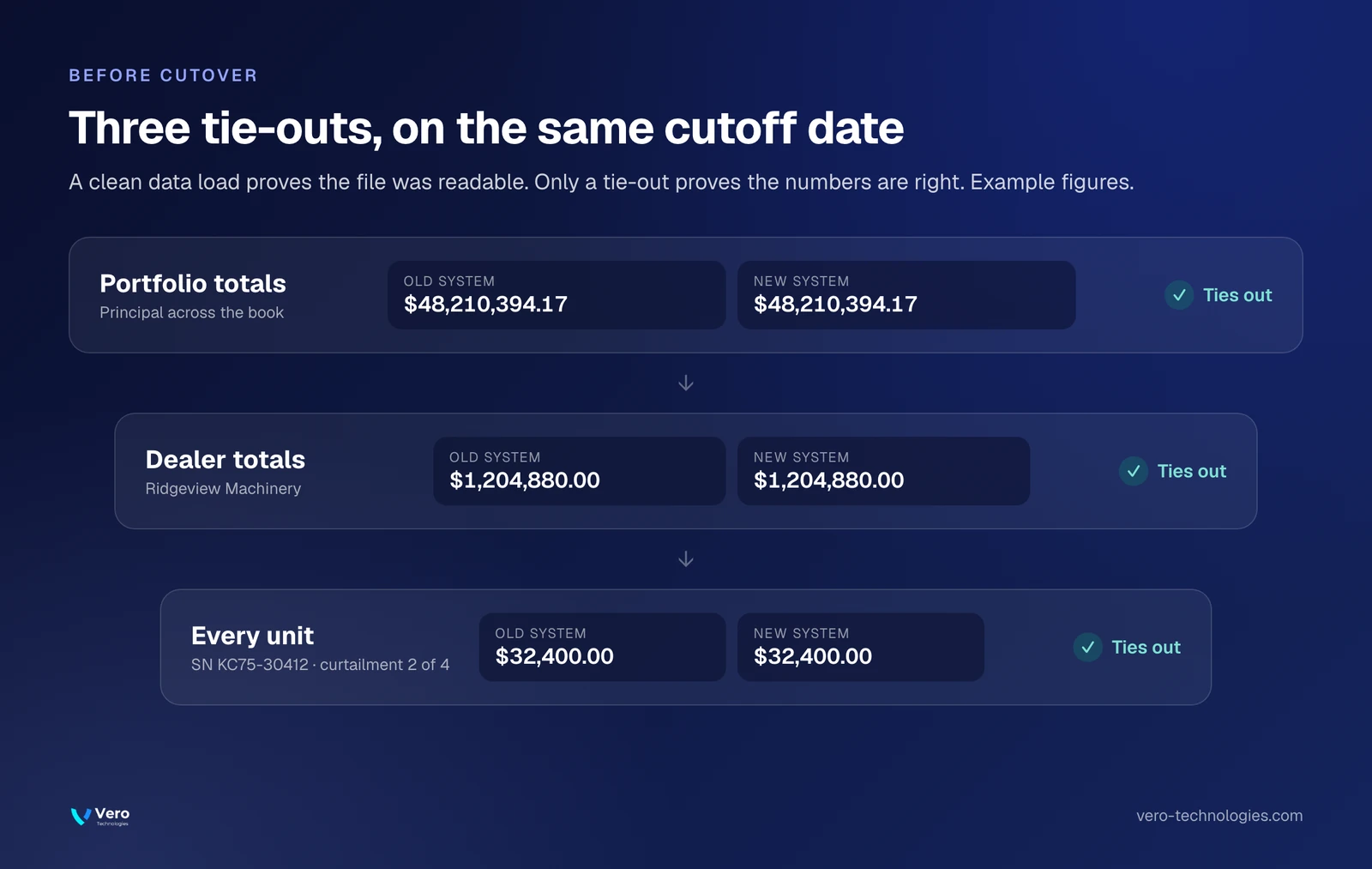
Portfolio totals. Outstanding principal, accrued interest, accrued fees, plus unit counts across the book. If these don't match, stop. Find out why before going further.
Dealer totals. Each dealer's outstanding balance, available credit plus unit count. Totals can match at the portfolio level while two dealers are each off by the same amount in opposite directions.
Every unit. Principal, curtailment position plus status for each VIN or serial. This is where conversions fail quietly. A unit that converted as in stock when it had already sold out of trust is a real exposure, and it won't show up in any total.
Run a short parallel period if you can, with both systems producing balances from the same day's activity. When the two agree for several cycles in a row, the numbers are proven. The exceptions list from that period is also your best training material.
Tell dealers before anything changes for them
Dealers don't care which system you run. They care whether their next funding request goes through and where their payment goes. Their credit agreements are with you, so a conversion doesn't mean a new application. What changes is how they log in, how they request funding, how they pay.
The worst outcome in a conversion is a dealer paying the old account after cutover, or a funding request stuck between two systems on a Friday afternoon. Both are avoidable with a short, dated plan:
- Tell dealers the cutover date well ahead of time, then remind them the week before.
- Send new portal logins and payment instructions in one message, and make the old instructions say clearly that they've stopped working.
- Decide how funding requests submitted during the cutover window get handled, and say so.
- Put a named contact on every dealer's first statement from the new system.

Keep audits running through the move
Audit coverage can't lapse because a system is changing. Pull the audit schedule for the next two quarters before cutover and confirm that every audit due during the window still has an owner.
If you use DataScan's field audits today, decide early whether audits move with servicing or stay with your current provider for a while. Both are workable. If they stay, someone has to carry audit results between two systems until they don't. That job needs a name and an end date, or it becomes permanent.
Plan the cutover weekend
The cutover is a sequence. Freeze new funding at a set time. Run final balances, load, reconcile. Open the new system, then make the old one read-only. Write the sequence down with an owner for each step and a decision point for rolling back. Then rehearse it once with real data before you do it for real.
Keep the old system readable after cutover. Questions about a unit's history will keep coming for months, and the answer is faster in the original screen than in an archive file.
Where VeroOS fits
VeroOS can be the core system of record for a floor plan program, from application to payoff, or it can run one capability next to the core you already have. Title Management is the most common standalone deployment. Audits and the Dealer Portal deploy the same way. Want VeroOS running next to DataScan or Solifi for a period? We'd scope any data connection with you and your vendor first. We don't assume one exists.
We run every implementation in five phases with a sign-off between each one, and data migration happens in the Build phase. We don't publish a standard timeline, because it depends on how much you're moving: dealers, units, integrations. For a side-by-side look, see VeroOS compared with DataScan. There's also VeroOS compared with Solifi.
If you'd rather not staff the servicing work yourself after the move, Vero can run it under Lending-as-a-Service, on VeroOS, behind your brand. The credit decisions stay with you either way.
Floor plan conversion questions
How long does a floor plan system conversion take?
It depends on the number of dealers and units. History matters too, as does the count of integrations that need a new source. Vero doesn't publish a standard timeline. Work backward from the notice date in your current agreement, and leave room for a parallel period before cutover.
Can we export our data from DataScan or Solifi?
Your agreement decides that. Check the export rights in your contract, including formats plus fees. Then ask your account team which extracts they provide and whether they'll answer questions about their tables during the move. Get the answers in writing before you give notice.
Do our dealers have to reapply when we change systems?
No. A dealer's credit agreement is with the lender, not with the software, so a system change isn't a new credit relationship. What changes for dealers is the login, the funding request screen, the payment instructions. Tell them the cutover date early and send new instructions in one message.
Should we run the old and new systems in parallel?
If you can, yes, for a short period. Have both systems produce balances from the same day's activity. Compare them at the portfolio level, then by dealer, then unit by unit. When they agree for several cycles in a row, the conversion is proven. The exceptions you found become training material.
Can we move servicing and keep DataScan field audits?
That's a decision to make early. Keeping your current audit provider while servicing moves is workable, but someone has to carry audit results between the two systems. VeroOS can run audits itself or alongside another provider. Vero would scope any data connection with you and DataScan first.




' d='M11.04 19.32Q12 21.51 12 24q0-2.49.93-4.68.96-2.19 2.58-3.81t3.81-2.55Q21.51 12 24 12q-2.49 0-4.68-.93a12.3 12.3 0 0 1-3.81-2.58 12.3 12.3 0 0 1-2.58-3.81Q12 2.49 12 0q0 2.49-.96 4.68-.93 2.19-2.55 3.81a12.3 12.3 0 0 1-3.81 2.58Q2.49 12 0 12q2.49 0 4.68.96 2.19.93 3.81 2.55t2.55 3.81'/%3E%3C/svg%3E)

